
Appearance
Shifts & hours
Shifts decide expected hours, late grace, half day, and how working hours are calculated.
Open the kiosk webpage → Masters → Shift.
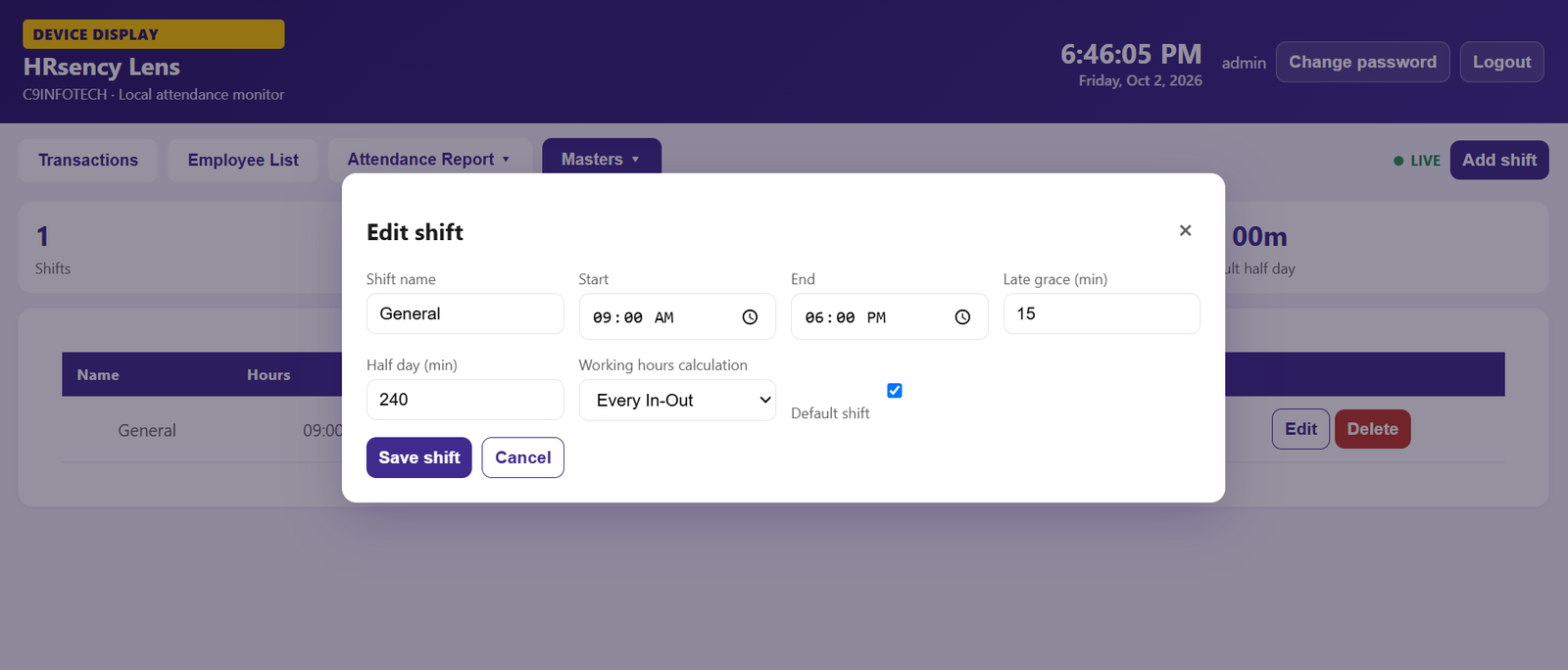
Add or edit a shift
| Field | Meaning |
|---|---|
| Shift name | Name shown on reports |
| Start / End | Expected shift times |
| Late grace (min) | Minutes after start before a punch is late |
| Half day (min) | Minimum minutes to count as half day |
| Working hours calculation | How the hourly report adds time |
| Default shift | Used when an employee has no assigned shift |
Calculation
| Option | Hours |
|---|---|
| Every In-Out | Add every IN→OUT pair. A break between pairs is not counted. |
| First-in Last-out | Last OUT minus first IN, including time in between. |
Example: IN 09:00, OUT 13:00, IN 14:00, OUT 18:00.
- Every In-Out = 8h 00m
- First-in Last-out = 9h 00m
Map employees
Masters → Shift mapping. Pick a shift for each employee, or leave Default.
The hourly report uses that employee’s shift calculation, and shows the calculation name under the shift.
Next: Reports.